The Manus alternatives worth shortlisting depend on what you need to hand over. Start with ChatGPT Work if you already use ChatGPT for business deliverables, Perplexity if source-backed research drives the assignment, Lindy for connected recurring routines, or Okou when you want research and follow-on work grounded in the context your team already has. Consider n8n when you want to own the workflow’s steps and maintenance.
And keep Manus on the shortlist. Its current documentation includes schedules, event-triggered tasks, and natural-language automation. Switching just to get recurring work may solve a problem your existing tool already handles.[1]
This comparison looks at documented capabilities, not hands-on benchmark results. It’s written from Okou’s perspective; Okou is included alongside alternatives with different strengths. Recommendations are starting points for a trial, not quality rankings. Source verification records are retained separately for editorial review.
Manus alternatives at a glance
| Product | Worth a trial when… | Research and report evidence | Recurring-work approach | Main thing to validate |
|---|---|---|---|---|
| Manus, the baseline | Your current end-to-end task handoff already works | Documents research, spreadsheets, decks, and dashboards | Schedules, supported events, and advanced automation in beta | Whether a different tool actually fixes your specific bottleneck |
| ChatGPT Work | You want to evaluate a tool inside an existing ChatGPT workspace | Work creates business deliverables; deep research provides documented reports | Work supports schedules, monitoring, and supported event triggers | Plan eligibility, source access, and the exact scheduled task’s context |
| Perplexity | You start with a research question and need inspectable evidence | Research plus document, spreadsheet, presentation, and app creation | Computer supports scheduled background work | Whether citations survive the final format and required layout |
| Lindy | Your report is part of an ongoing inbox, calendar, or Slack routine | Documents recurring briefs and spreadsheet-based client-update drafts | Plain-language routines with a trigger, instructions, and destination | Data scope, delivery destination, and workspace-admin requirements |
| Okou | You want research and follow-on action grounded in existing business context, with people reviewing decisions | Documents sourced research, reports, and presentations; evaluate the data sources needed for your question | One-off assignments, plus documented schedule or supported event-triggered execution | Context fidelity, source coverage, collaboration boundaries, and the actual draft or artifact |
| n8n | You want a process assembled from explicit workflow steps | You must provide the research and reporting steps in your workflow | Schedule Trigger starts a configured, published workflow | Who builds, tests, and maintains the process |
Sources: Manus [1–2], OpenAI [3–4], Perplexity [5–6], Lindy [7], Okou [8–9], and n8n [10]. A documented feature does not establish equal behavior across plans or accounts.
First, define the Manus job you want to replace
“Research competitors” leaves too much room for a convincing but unusable result.
Try a specific assignment: compare four competitors’ public pricing pages and release notes, identify changes that could affect your next sales conversation, and deliver a short report with source links. Then ask whether the same assignment can run next Monday without treating last week’s findings as new.
For the staging demonstration in this article, we used a narrower, one-off brief: read three named official documentation pages, compare recurring-execution and context assumptions, and identify evidence gaps. No pricing history or previous report was supplied, so the task explicitly prohibited change-over-time claims.
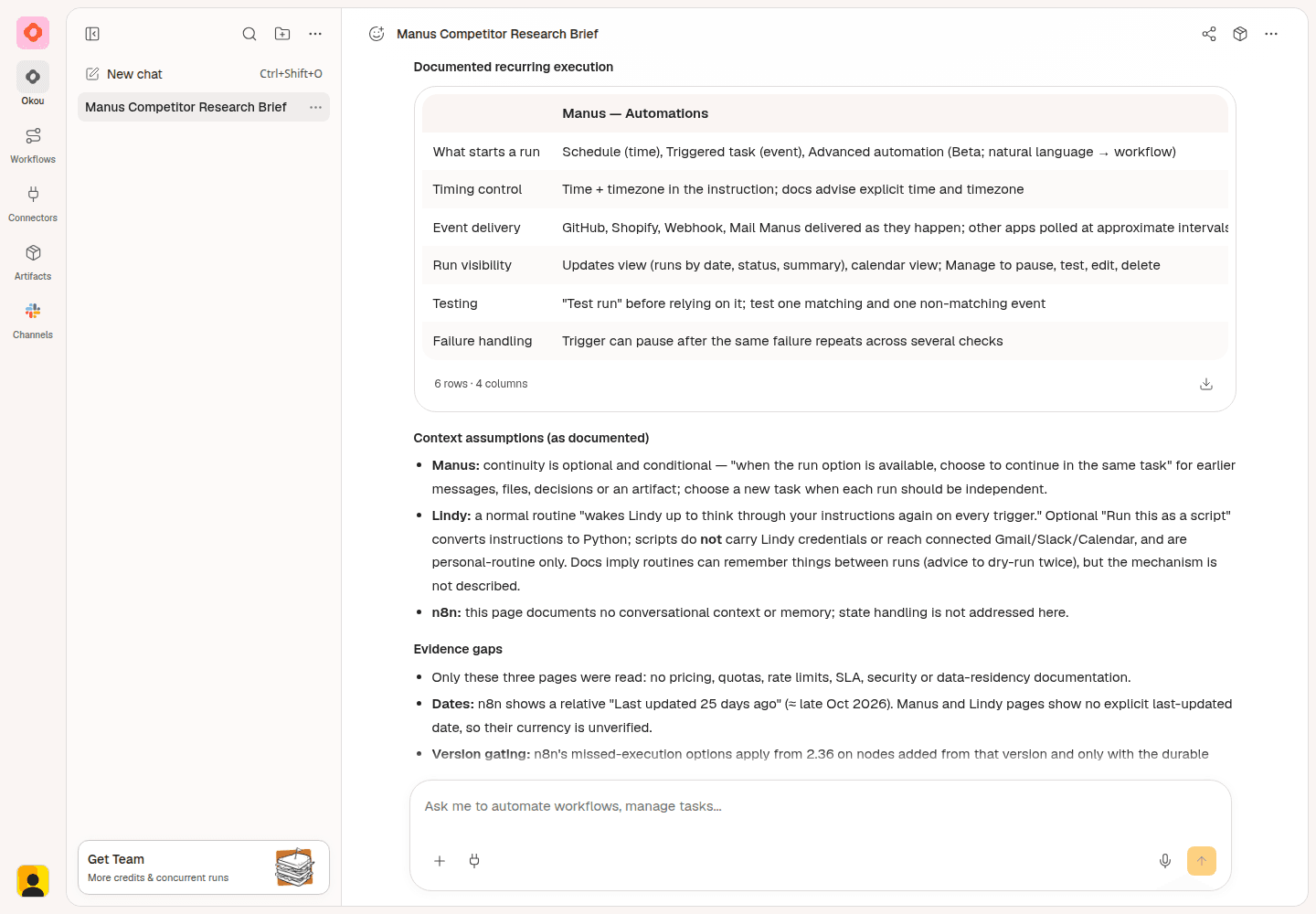
Figure 1. The completed DEMO research report inside the full Okou interface. This scroll position shows the Manus column of the horizontally scrollable comparison table, plus context assumptions below it. The fictional consulting brief produced a real response; this is not an input-only screen. Captured November 23, 2026 via staging-browser in this article’s isolated test conversation. Full 1440 × 1000 viewport, uncropped; screenshot provenance is retained internally.
That job exposes four buying questions:
- Evidence: Can you trace an important claim to the page that supports it?
- Handoff: Is the result a usable document or presentation, or text you still need to rebuild?
- Continuity: Can the next run use the agreed instructions and comparison baseline?
- Control: Can it stop at a draft and tell you when a source or account is unavailable?
Use the same brief when evaluating each product. Otherwise, you’re comparing different assignments rather than different tools.
Manus already documents research-to-deliverable work, including spreadsheets and executive decks.[2] Its automation documentation also describes continuing in the same task when that run option is available.[1] Start by identifying what isn’t working for you: the report’s format, access to a source, review effort, or process ownership. Don’t assume another subscription removes those constraints.
Which Manus alternatives should you shortlist?
1. ChatGPT Work: start here if your team already uses ChatGPT
OpenAI describes Work as an agent for longer, multi-step assignments and finished deliverables. Its documentation lists reports, spreadsheets, presentations, documents, and Sites. Work can use project context and run cloud tasks across supported surfaces.[3]
For research specifically, ChatGPT’s deep research feature can use public websites, uploaded files, and eligible connected apps to produce a documented report. You can review the proposed plan and change the research direction while it runs.[4]
Compared with Manus: the reason to try Work is consolidation. If your source files and discussions already live in ChatGPT, test whether you can finish the report there before adding a separate workspace. That’s a workflow recommendation, not evidence that its research is more accurate.
Recurring work is part of the comparison too. OpenAI documents scheduled Work, monitoring, and supported connected-app event triggers. Availability depends on your plan and workspace controls.[3] Don’t transfer assumptions from an old “ChatGPT agent” review to the current Work experience.
Check before switching: run the assignment in the exact mode and account you plan to use. Verify that a scheduled run can reach the sources it needs, that the exported file is usable, and that usage limits fit the frequency. Existing access to regular ChatGPT doesn’t establish access to every Work feature.
2. Perplexity: shortlist it when evidence comes before layout
Perplexity’s asset documentation supports documents, spreadsheets, presentations, and HTML apps. It also supports follow-up edits, version history, previews, and downloads.[5]
There’s a useful detail in that documentation: its citation promise is specifically attached to documents. Don’t assume a generated slide deck or spreadsheet gives every claim the same source treatment. Open the exported file and check.
Compared with Manus: Perplexity is worth testing when your acceptance criterion is an evidence-backed report, such as a supplier comparison or market brief. Manus also documents research and report creation; the practical question is which output makes your review easier, not which product has “research” in its feature list.
Perplexity’s official Computer workshop documentation describes scheduled background reports, monitoring, and briefing tasks.[6] It should not be treated as a one-off search tool only.
Check before switching: Perplexity’s asset help page says applying specific slide layouts or templates isn’t currently supported in that asset workflow.[5] If a client expects an exact presentation template, test that requirement separately. A well-sourced document and a client-ready deck are different deliverables.
3. Lindy: shortlist it for recurring operational briefs
Lindy documents routines built around a trigger, a plain-language prompt, and a destination. Its examples include a weekly client-update draft based on a spreadsheet, meeting preparation, and inbox-related work.[7]
You can describe a routine in chat or configure it through the routine interface. The current documentation does not support dismissing Lindy as a tool that always requires manually wiring every step.
Compared with Manus: try Lindy when the report belongs inside an ongoing operating routine. For example, an account manager might need a Friday draft summarizing a client spreadsheet rather than a separate research project. That fit is grounded in Lindy’s documented routine example, not in a measured advantage over Manus.
Lindy supports scheduled and event-driven routines. Personal and workspace routines have different delivery options; workspace routines require admin setup and use Lindy Teammate in Slack.[7]
Check before switching: use its documented dry-run feature before enabling unattended work. Lindy explicitly notes that a dry run suppresses writes and delivery, so it cannot prove the final sending or posting step works. Test delivery separately to a safe destination. Also test a quiet period: a routine should report no relevant changes rather than invent an update.
4. Okou: shortlist it for research that leads to context-aware action
Okou is a cross-functional AI teammate for business work. The reason to evaluate it here is act on context: bring together the question, prior discussion, source material, and constraints, then ask for research and a concrete next step that respects them. Its documented deliverables include sourced research briefs, reports, and presentations.[8–9]
For a competitor brief, the useful output is not another list of features. It is evidence connected to your decision: which changes matter to your positioning, what remains unknown, and which questions a person should resolve before acting. Okou’s research positioning includes built-in data access for information gathering; verify the exact source availability, coverage, freshness, and retrieval limits for your assignment. Built-in access is not a guarantee that every source is available or every claim is correct.
Compared with Manus: evaluate Okou when your bottleneck is carrying business context from research into follow-on work with colleagues. A buyer might need the research brief to reflect an earlier positioning discussion, then ask for a revised sales-question list without restating the constraints. That is the proposed fit to test—not proof of better memory, broader data coverage, or higher accuracy than Manus.
Team collaboration belongs in that evaluation too. Can the relevant colleague review the evidence and pick up the work without losing its assumptions? Check the actual conversation or artifact sharing surface, who can see it, and whose accounts authorize any action. Sharing context must not be treated as sharing credentials. This article has not conducted a multi-user collaboration test.
A useful pilot has two turns. First, request a source-linked competitor report using an approved business brief. Then add a real constraint—such as “we are not changing pricing”—and ask for revised discussion points based on the same evidence. Check whether the response preserves both the sources and the new constraint. Let a person decide which recommendation to adopt.
There is overlap with Manus: both document research, business deliverables, and recurring execution. The distinction to investigate is how well the product supports your context-to-research-to-action handoff, not whether one vendor alone can automate work.
Check before switching: inspect the source coverage and citations, test a same-context follow-up, and review the resulting artifact. Verify teammate access in the actual sharing UI before exposing business material. Keep external actions off during the pilot. If you later schedule the work, define its owner and missing-source behavior separately.
See what Okou delivers for the documented work categories.
A real staging example: research, then a context-aware next step
We ran the narrower DEMO brief described above in an isolated test account using Auto and real agent execution. The completed response compared the three documentation pages, separated context assumptions from evidence gaps, and supplied source links. It did not claim to measure the competing products’ actual reliability.
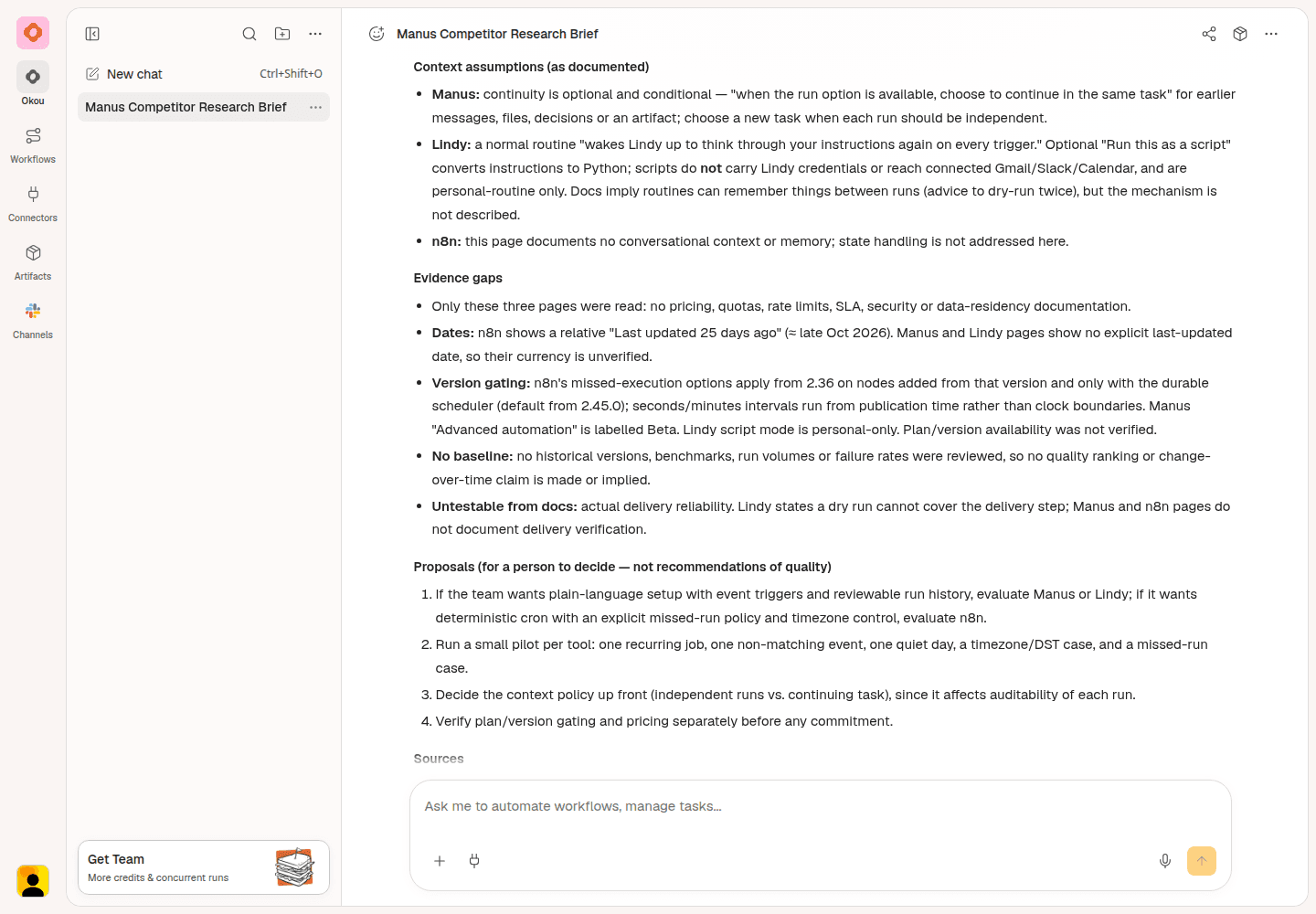
Figure 2. A second scroll position in the same completed DEMO report: context assumptions, evidence gaps, and proposals for a person to decide. Navigation, conversation title, and composer remain visible. Captured November 23, 2026 via staging-browser; full 1440 × 1000 viewport, uncropped. The generated analysis is for review, not an independent benchmark or proof of every statement’s accuracy.
Next, in the same conversation, we asked for an internal decision note without browsing again. The follow-up emphasized that pricing must remain unchanged and no automation had been approved. It requested one finding per product, two questions for a colleague, and a proposed next step—with missing owners and deadlines left unassigned.
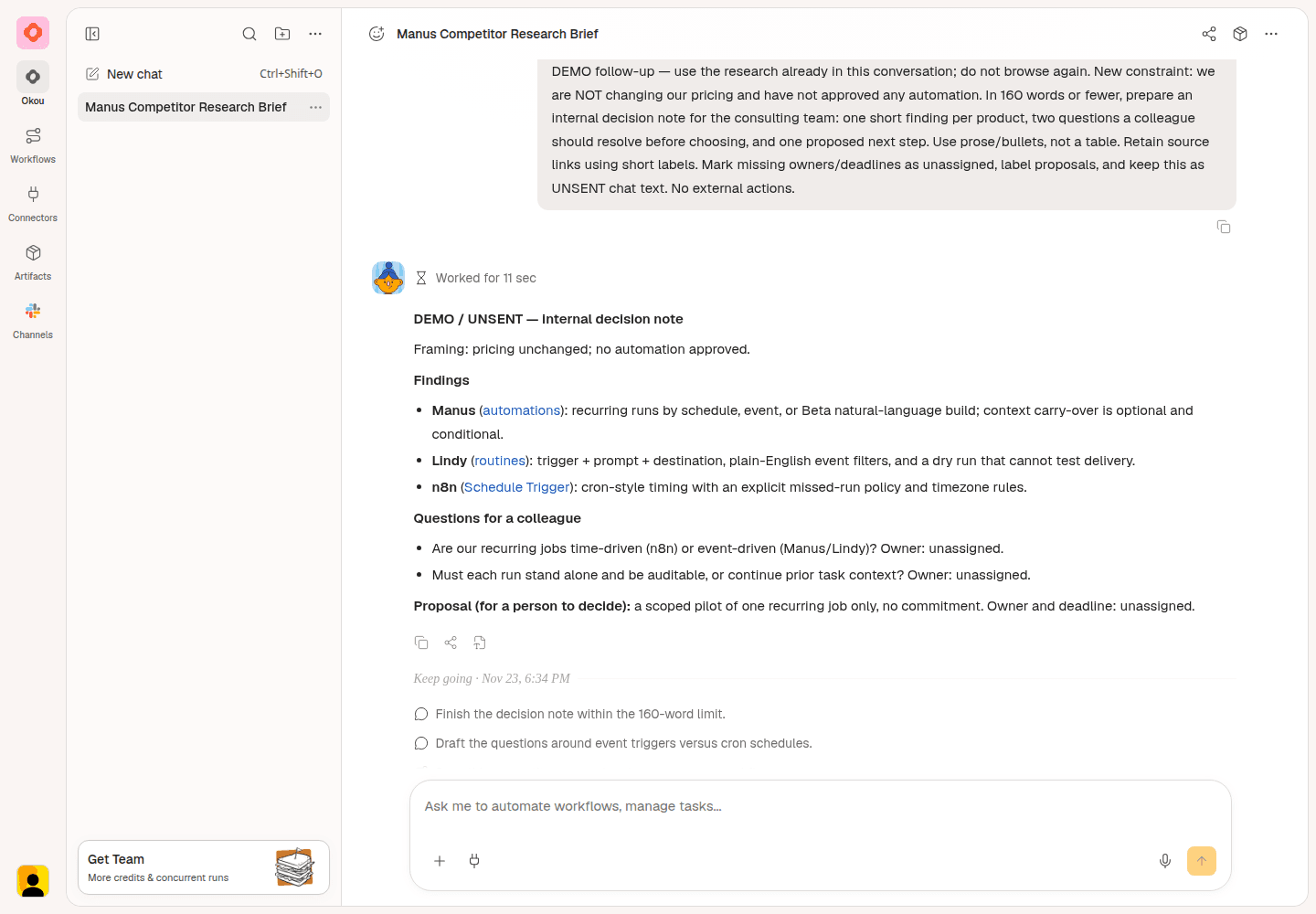
Figure 3. The actual follow-up request and completed decision note in the same conversation, with full navigation, conversation title, and composer visible. The result preserves “pricing unchanged” and “no automation approved,” leaving owners and deadlines unassigned. Captured November 23, 2026 via staging-browser; full 1440 × 1000 viewport, uncropped. UNSENT is generated chat text, not a mailbox draft or a tested approval control.
This demonstrates one research-to-decision-note handoff in Okou. The note was not sent to a colleague, and no second user joined the test. We did not test scheduling, downloadable report formatting, historical change detection, or the same task inside the other products. The broader four-competitor benchmark remains an evaluation proposal.
5. n8n: consider it when owning the process is the point
n8n belongs in this comparison as a different buying choice: a workflow you configure and maintain. Its Schedule Trigger documentation describes running workflows at fixed intervals, setting timezones, and publishing the workflow before a schedule can run.[10]
A schedule alone doesn’t research competitors or write a report. Your workflow still needs the steps that retrieve sources, process information, and create the output. n8n also documents AI agents, tools, and memory, so this route can include agent judgment rather than fixed rules only.[11]
Compared with Manus: n8n makes sense when you want the process represented as explicit steps your team owns. For the competitor-report example, you would decide how pages are retrieved, what information is stored between runs, and where the report goes. That ownership may be valuable when the procedure is stable and someone can maintain it.
It also changes the staffing question. Instead of only reviewing an agent’s result, somebody must own the workflow’s configuration and repairs.
Check before switching: name that owner before adopting it. Test a missing source, an expired credential, and an incomplete run. Don’t treat a successful scheduled start as proof that the report was completed correctly.
Direct delegation or a workflow you build?
Choose direct delegation when the assignment needs judgment about changing source material and you want to describe the desired result. Choose a configured workflow when you want explicit control over the sequence and can maintain it. Several products support both patterns, so compare the actual process rather than the category label.
For a founder requesting a one-off supplier comparison, writing a brief may be the right amount of setup. For an operator running a fixed reporting procedure across known inputs, building the process may be worthwhile.
A natural-language setup screen doesn’t remove the need to review the resulting routine. Check the source account, schedule, destination, and actions before activating anything. This applies to Manus and its alternatives.
Test the report before you automate it
Use this proposed evaluation brief with whichever products you shortlist:
Compare four competitors using only the public pricing pages and release notes I provide. Date the report and link each material factual claim to its source. Separate observed changes from your interpretation. If a page is unavailable, identify the gap instead of inferring its contents. Return an executive summary and a comparison table as a downloadable document. Do not contact anyone, publish anything, or change connected records.
Then run a follow-up against the reviewed baseline:
Update the report using the same sources. Compare against the previous version and include only newly observed changes. Preserve unresolved evidence gaps. Keep the result as a draft for review.
Record the things a feature checklist misses:
| Acceptance check | What to inspect |
|---|---|
| Claim traceability | The linked page actually supports the claim, including its conditions |
| Report usability | The downloaded file opens correctly and is readable without rebuilding it |
| Continuity | Old findings aren't presented as new; missing sources remain visible |
| Operational safety | The job respects draft-only instructions and reports blocked access |
Track correction time and usage separately. A low subscription fee doesn’t establish a low cost per accepted report. We have not run this benchmark, so no product receives a fabricated score.
Is a Manus alternative cheaper?
It may be, but compare the cost of the same accepted output. Subscription access, task allowances, extra usage, and the human time spent fixing a report all matter. This article does not quote a price winner because it has not verified equivalent plans and workloads across every product.
If you already pay for an eligible ChatGPT or Perplexity plan, test the included capabilities first. If you’re considering recurring reports, estimate the number of runs and the cost of failed or repeated work before committing.
Can you move an existing Manus workflow?
Plan to recreate and validate it unless the destination explicitly supports importing your setup. This comparison has not verified automatic migration between products.
Carry over the brief, approved source list, output example, and review rules. Reconnect accounts deliberately. Check timezone and delivery behavior, then pause the old schedule when the replacement is ready so you don’t create duplicate reports or actions.
Which alternative should you try first?
Pick two tools around your bottleneck. For source-led research, start with Perplexity and the research capabilities already available in ChatGPT. For recurring operating briefs, evaluate Lindy against the Manus routine you already have. For research that should inform a next step using prior discussion and team context, include Okou and inspect both the evidence and the follow-up. For explicit workflow ownership, consider n8n with a named maintainer.
Stay with Manus if it already delivers the report you need with acceptable review effort. A new tool should remove a specific problem, not just produce a different-looking demo.
Want to evaluate Okou? Bring one business question, the relevant discussion, and your constraints. Ask for a source-linked research brief, then a follow-up that uses the same context to prepare your next decision. Review the evidence with the right colleague; keep sending, publishing, and record changes off until explicitly approved.
Sources
The reference titles below identify the vendor documentation used for this editorial comparison, not independent performance evidence. Verification URLs and dates are retained in a separate internal research file. Plan eligibility and recently changed behavior should be rechecked before publication.
- Manus — Automations. Schedules, supported event triggers, advanced automation beta, testing, and context options.
- Manus — Manus for Analysts. Stated research and report-delivery capabilities. Speed, scale, and exclusivity marketing claims are not adopted here.
- OpenAI — ChatGPT Work and Codex. Current Work experience, business deliverables, cloud/project context, recurring and supported event-triggered tasks, eligibility, and permissions.
- OpenAI — Deep Research. Research planning, source selection, connected-app eligibility, and documented reports.
- Perplexity — Creating assets with Perplexity: Overview. File types, editing, export, document citations, and template limitations.
- Perplexity — Computer for Buyside Professionals. Official workshop notes documenting cloud execution, reusable skills, and scheduled reporting. Exact credit allowances are not used in this article.
- Lindy — Routines. Natural-language creation, triggers, destinations, admin requirements, and dry-run boundaries.
- Okou — Official homepage. Business positioning, research-to-deliverable work, cloud execution, and per-user permissions. Illustrative homepage scenarios are not treated as customer case studies. https://www.okou.ai/en
- Okou — What Okou delivers. Research, reports, presentations, and one-off/workflow/automation modes. Page displays last updated October 29, 2026. https://www.okou.ai/en/docs/what-okou-delivers/capabilities
- n8n — Schedule Trigger. Fixed-interval workflows, publication requirement, and timezone settings.
- n8n — Integrate AI. AI workflow components, including agents, tools, memory, and multiple model providers.