Demonstration note: These are real Okou interface captures using fictional Acorn Studio inputs. The test covers public-source research, supplied-data reporting and a two-turn context update. Follow-ups are chat drafts, not sent emails. It does not test connected Ads/CRM data or multi-user collaboration.
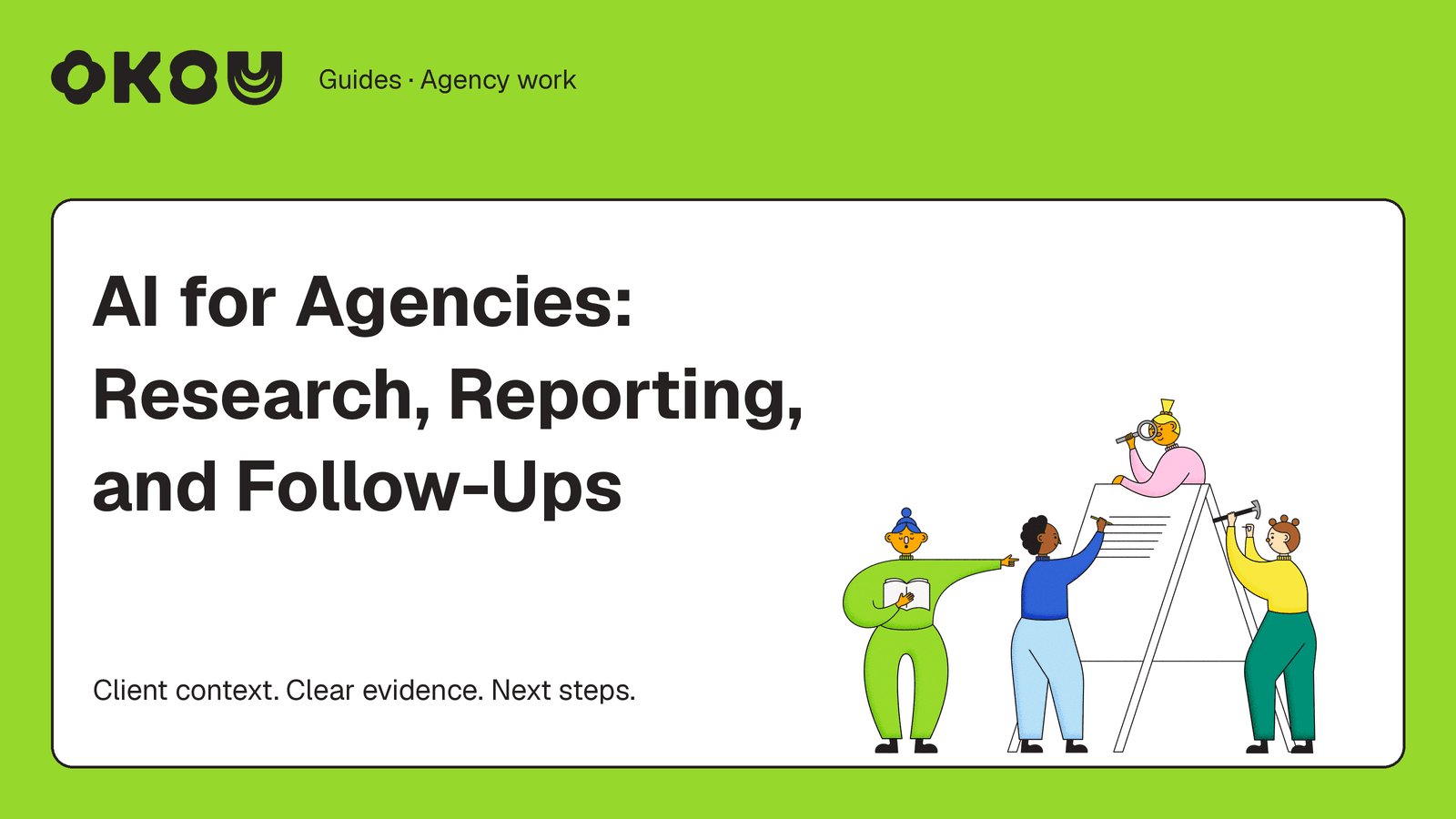
AI for agencies is useful when it can act on context: understand what the client wants, carry forward what the team already knows, and prepare the next piece of work without losing the constraints. That might be a source-attributed research brief, a report that prioritizes qualified enquiries over form volume, or a follow-up that asks for missing evidence instead of inventing a decision.
The account lead still decides what to recommend. AI gathers information and prepares work for that decision; the strategist, analyst, and account lead need to see the evidence, assumptions, and unresolved questions behind it.
| Agency job | Give AI | Ask for | Accept it when |
|---|---|---|---|
| Client research | Approved intake notes, existing discussion, and named public sources | A kickoff brief that connects findings to the client's decision | Facts have sources; gaps and competing explanations are visible |
| Client reporting | Approved exports, metric definitions, client goal, and account notes | A performance summary with a calculation trail and questions for the team | Numbers reconcile; the interpretation reflects the goal and constraints |
| Client follow-ups | Reviewed report, earlier discussion, and confirmed decisions | An unsent email plus an internal handoff | The draft carries context forward without inventing recipients or commitments |
You can apply this approach with an assistant, a reporting platform, or your existing tools. Tool choice matters after you've defined what the work must contain.
Set the client boundary before using AI
Start with a short client work brief. It should identify the client, the sources AI may use, the output's audience, and who approves it. Include the reporting period and timezone when numbers are involved.
Give the assistant the relevant client context, not every agency document. The client's contract, margins, and unpublished campaign plans belong only in an assignment whose access and purpose justify them. Identify which notes are current and which decisions supersede earlier discussion.
A useful starting instruction is:
Work only on the named client using the sources I provide or explicitly approve. Don't use other clients' information. Separate verified facts from assumptions and proposals. If a source is unavailable, identify the gap. Prepare drafts only; don't send messages, change campaigns, or update client records.
That's a work instruction, not a security boundary. Check the tool's actual account access, sharing settings, and data-handling terms. A folder labeled with a client's name doesn't establish that other information is inaccessible.
For a fuller explanation of source selection and permissions, see Okou's guide to AI agent context management.
1. Use AI for client research that improves the kickoff
A useful client brief helps your strategist decide what to ask. It doesn't need a long company history.
Give AI the approved intake form, sales notes, and relevant discussion, then specify which public sources it can research. A practical brief connects the client's stated goal, current positioning, and named competitors to questions that could change your recommendation.
With Okou, built-in research data is part of the reason to evaluate it for this information-gathering work. Start with the question your team needs to decide, then check whether the required source and date range are available. Don't assume that every company, website, or social account is covered—or that public information can explain a private sales outcome. This article doesn't claim a verified tool count or universal data coverage.
Keep source types distinct. A client's website establishes what the client claims. It doesn't establish market share or prove that customers agree.
Copyable client research prompt
Prepare a kickoff brief for this client using the attached intake notes and the public company and competitor URLs listed below. Include: the client's stated business goal; an evidence table of relevant positioning and offer claims; questions that could change our proposed scope; and assumptions we need to validate. For each public claim, include its source URL and the date you accessed it. For each private-source claim, name the supplied document or note. Don't infer revenue, ad spend, customer demographics, or campaign performance from public content. Don't contact anyone.
The research result: sources with limits
Our fictional Acorn Studio brief said the client wanted more qualified enquiries, sales suspected “poor lead quality,” and no budget change was approved. Alongside a two-period CSV, we gave Okou two official vendor URLs to read: AgencyAnalytics' AgencyAI page and Ziflow's agency AI article.
The completed research distinguished vendor-described capabilities from evidence about the client. AgencyAnalytics described AI analysis of client reporting data with source links; Ziflow described creative checks and review. Neither source could establish why Acorn's qualification rate fell. The resulting evidence request asked for campaign-level results, qualification definitions, and Sales rejection reasons—not a budget increase.
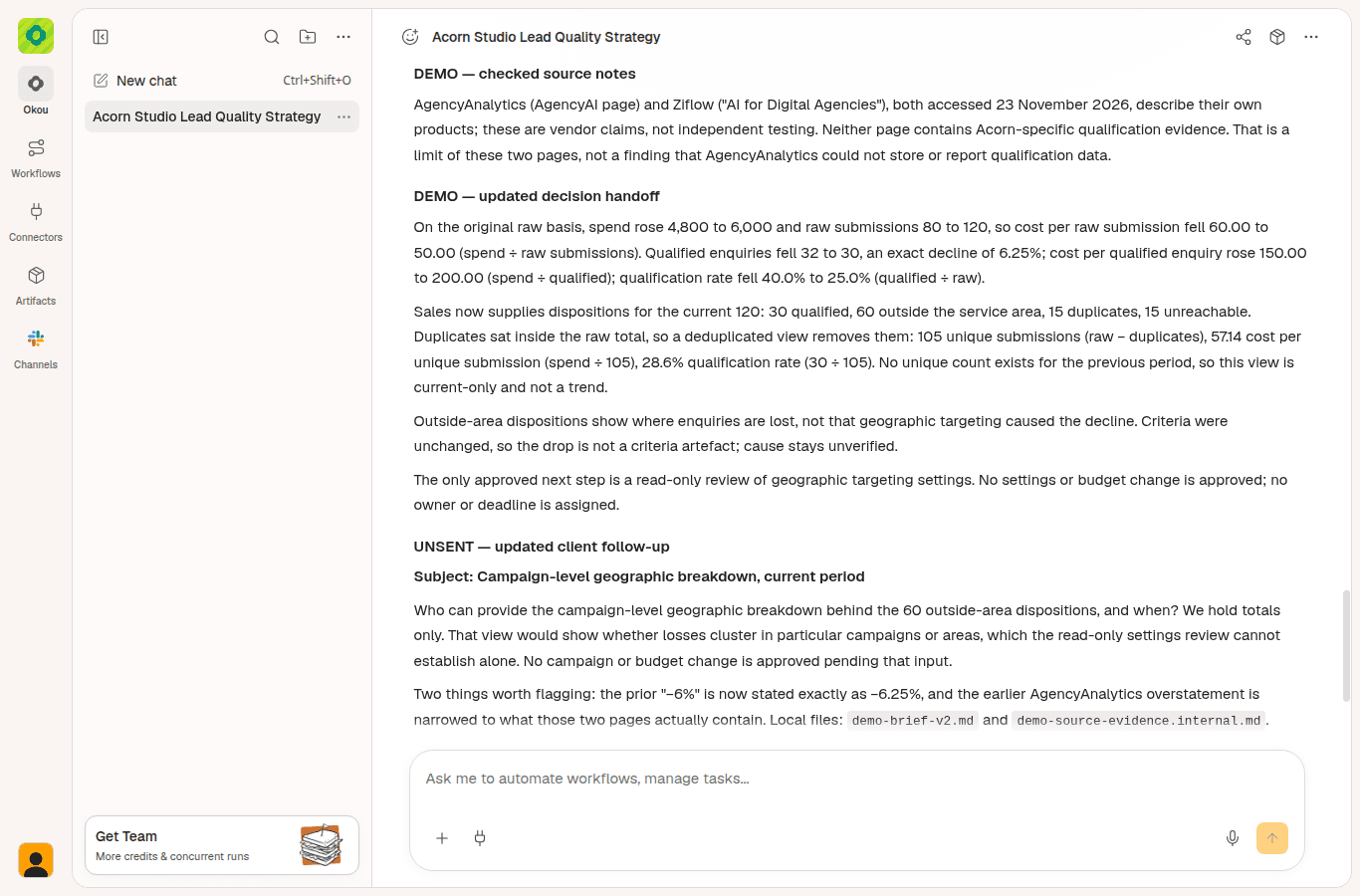
Figure 1. Full Okou desktop UI showing checked source notes and the context-aware handoff. Vendor descriptions are not client-specific evidence or independent product tests. The notes revise the first turn’s research without retrieving new pages. Source: controlled staging-browser demo, November 23, 2026.
This narrow test used built-in research data and produced a source-attributed brief. The result does not establish universal source coverage, reliable access to every website, or either vendor's effectiveness. The report below shows the first-turn supplied-data analysis; the later handoff shows what changes when Sales supplies new evidence in the same conversation.
What an acceptable brief looks like
The following is a fictional example of an internal brief structure, not research about an actual client:
| Finding | Evidence record | Implication for kickoff |
|---|---|---|
| Client wants more qualified enquiries | Approved intake, question 4 | Ask how sales defines a qualified enquiry |
| Landing-page copy promises a fast response | Supplied page extract; live URL still needs checking | Confirm the actual service standard before repeating it |
| Sales notes mention poor lead quality | Sales handoff notes; no CRM evidence supplied | Request qualification and close-rate data before changing targeting |
| A competitor emphasizes specialist expertise | Competitor page supplied for review | Discuss whether the client's own expertise is documented |
Notice the unresolved items. They are part of the deliverable.
“Poor lead quality” might mean the wrong buyers, duplicate submissions, or slow sales follow-up. The brief should preserve that ambiguity until someone checks the evidence. Otherwise, a loose phrase from a sales call can turn into an unsupported campaign diagnosis.
Research acceptance check
Open the sources behind claims that could affect scope, budget, or positioning. Confirm that quotations still appear on the page and that the brief hasn't upgraded a proposal into a fact.
Reject invented competitor metrics. If public evidence doesn't establish what your team needs to know, turn the gap into a specific research question or client request. For each finding, ask: does it change the proposed scope, explain an observation, or simply describe the company? Only the first two need to drive the next discussion.
An account lead can then review the brief with the strategist: which facts are usable, which interpretation is disputed, and what information would settle it. That is a collaboration requirement to test in your own team—not a claim that we tested two people working in Okou.
For a narrower example of public-source research, Okou's Instagram profile analysis guide shows a dated sample, source-linked posts, and explicit limits on private analytics. Public likes are not a substitute for a client's reach or sales data.
2. Use AI for client reporting without losing the metric definitions
AI can help turn approved data into a readable report. Before asking for commentary, lock down what the numbers mean. Each metric needs a source, reporting period, definition, and comparison basis. Review the calculations separately from the explanation, then check the recommendations against the client's actual goals.
The dangerous part is often a plausible sentence attached to mismatched data.
An ad platform's conversion count and a CRM's qualified-lead count answer different questions. Don't add them together as if they were separate customers. And don't call a reported conversion a sale unless the underlying definition supports that statement.
Build a small reporting contract
For each metric, record:
- Its source and exact definition, such as “forms submitted” versus “sales-qualified enquiries.”
- Its date range, timezone, and comparison period.
- Relevant inclusion rules, currency, and known collection gaps.
- Its source location so a reviewer can reproduce the figure.
The agency and client should agree on the definitions. AI should not make those decisions while writing the summary.
A worked reporting example
These figures are invented for illustration. They are not Okou results or a claim about agency performance.
Assume two equal-length reporting periods, the same currency, and unchanged tracking. The CRM qualification totals are supplied as final for both periods.
| Metric | Previous period | Current period | Calculation or interpretation |
|---|---|---|---|
| Ad spend | $4,800 | $6,000 | Up 25% |
| Submitted enquiries | 80 | 120 | Up 50% |
| Cost per submitted enquiry | $60 | $50 | Spend ÷ submitted enquiries; down 16.7% |
| Qualified enquiries | 32 | 30 | Down 6.25%, exactly |
| Cost per qualified enquiry | $150 | $200 | Spend ÷ qualified enquiries; up 33.3% |
A summary focused only on form submissions would celebrate cheaper leads. The client's qualification data changes the discussion.
An acceptable draft might say:
Submitted enquiries increased from 80 to 120, while cost per submission fell from $60 to $50. Qualified enquiries fell from 32 to 30, increasing cost per qualified enquiry from $150 to $200. Before proposing more spend, review the qualification reasons and whether recent enquiries have had enough time to be assessed. These totals don't establish why qualification changed.
That last sentence matters. The figures identify a question. They don't prove that targeting, creative, or sales handling caused the change.
Copyable client reporting prompt
Using only these approved exports and metric definitions, draft a client performance report for the stated period. Show a metric table with source references and formulas, a short executive summary, and proposed next actions. Separate observed changes from possible explanations. Flag mismatched periods, incomplete qualification, missing values, and changed tracking. Don't treat missing data as zero. Don't combine platform conversions into unique customers. Don't change campaign budgets or send the report.
The staging result: a report you can inspect
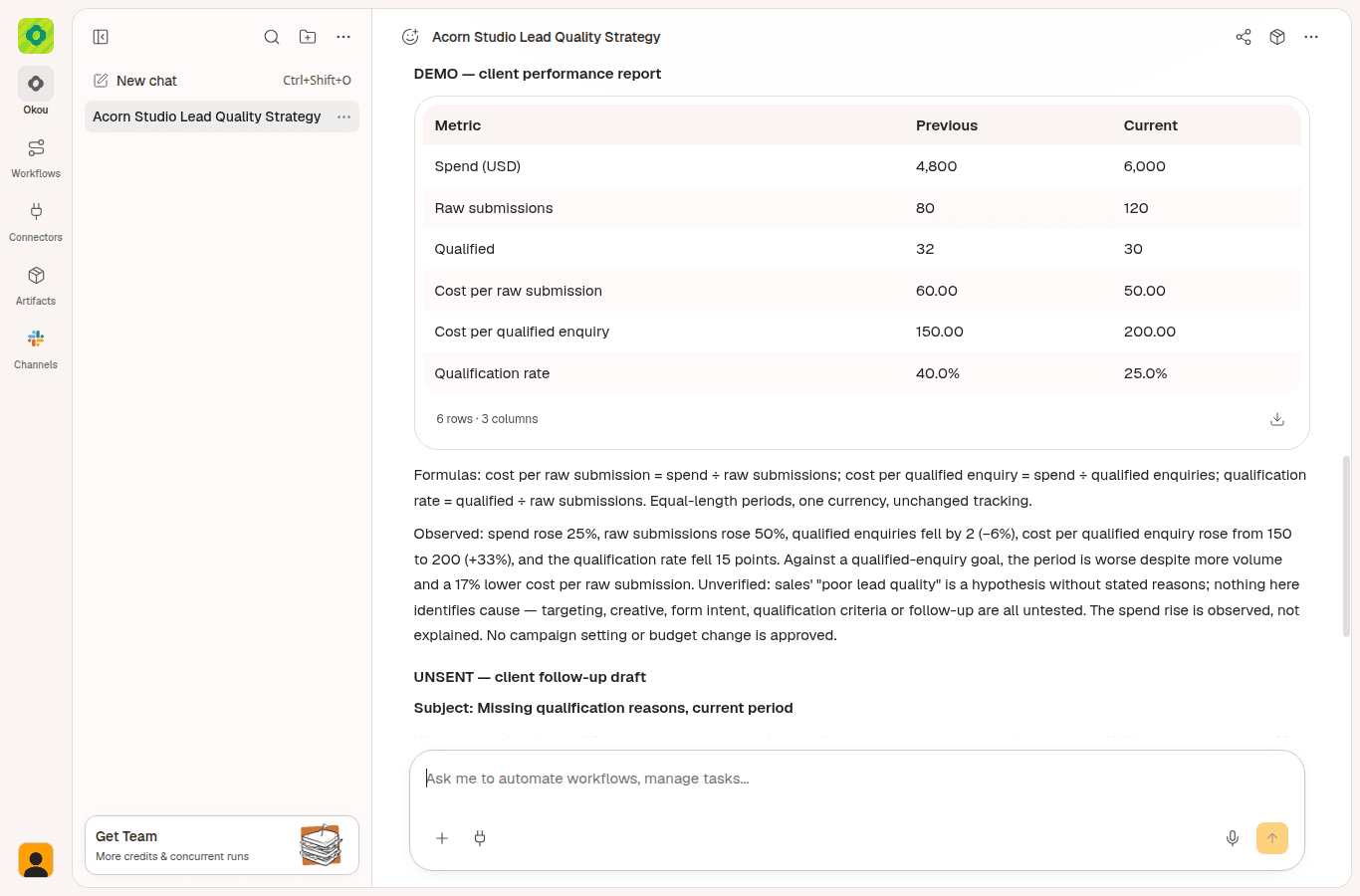
Figure 2. Full Okou desktop UI showing the actual performance report, metric definitions and formulas. The qualified-enquiry goal gets worse even as submissions get cheaper. Fictional supplied data; no live Ads/CRM connection. Source: controlled staging-browser demo, November 23, 2026.
We checked the cost calculations against the supplied values. The output also derived a qualification-rate decline from 40% to 25%, a 15-percentage-point change. The exact qualified-enquiry count decline is 6.25%; the first response rounds it to a whole −6%, while the article table and later revised result retain the exact figure. The first response also rounds the cost changes to whole percentages. Check rounding conventions as well as formulas.
The interpretation leaves the cause unverified. This demonstration checks a supplied-data calculation and draft; it does not validate data collection, attribution, or an ads-to-CRM integration.
Act on the context, not just the biggest percentage
The client's goal was qualified enquiries—not more forms. The output therefore treated cost per qualified enquiry as the decision-relevant metric and proposed obtaining rejection reasons before changing spend. It carried the brief's “no budget change approved” constraint into the next deliverable.
That is the useful test of acting on context: does the assistant prepare the next evidence request that your team actually needs? It shouldn't turn “poor lead quality” into a diagnosis or make the budget decision for you. In this example, research and information gathering should help the team distinguish between possible explanations; the supplied totals alone cannot settle them.
Reporting acceptance check
Recalculate the headline figures and every number behind a recommendation. Check whether each percentage describes a relative change or a percentage-point difference. Review date filters and confirm that zero means zero rather than an absent export.
Then read the narrative without the charts. Does it claim a cause the data cannot establish? Does “revenue” really mean revenue? Is the report recommending more spend because a convenient metric improved while the client's main outcome worsened?
A readable report can still be wrong. The review needs both an analytics owner and someone who knows the account.
3. Turn reviewed reports into client follow-up drafts
Reporting creates work: a client decision, a request for missing data, a new task, or a scope discussion. Use AI to draft the handoff from the reviewed report and confirmed decisions.
Don't let it invent agreement to make the email sound complete.
Separate what was approved from what was discussed. An account manager may mention a new landing page without promising to build it. A client may ask about a larger budget without approving one.
Copyable follow-up prompt
Draft an unsent follow-up email from this approved report and these reviewed meeting notes. Summarize confirmed decisions and list requested actions with their recorded owners and deadlines. Mark an owner or deadline as unconfirmed if the notes don't specify one. Keep recommendations separate from approved work. Flag anything that may change scope, fees, or delivery dates. Produce a separate internal action register with source references. Don't send the email or update external records.
For a hypothetical meeting where the only confirmed next step is a qualification review, a suitable draft could read:
Subject: Reporting follow-up: enquiry qualification review
Hi Jordan,
We reviewed the increase in submitted enquiries alongside the lower qualified-enquiry total. Our next step is to review the qualification reasons before proposing a budget change.
Could you confirm who can share the qualification breakdown and when it will be available?
No budget change was approved in this meeting. Once we've reviewed the breakdown, we'll send recommendations for your review.
Thanks, Alex
The draft asks for the missing owner and timing. It doesn't manufacture a Friday deadline.
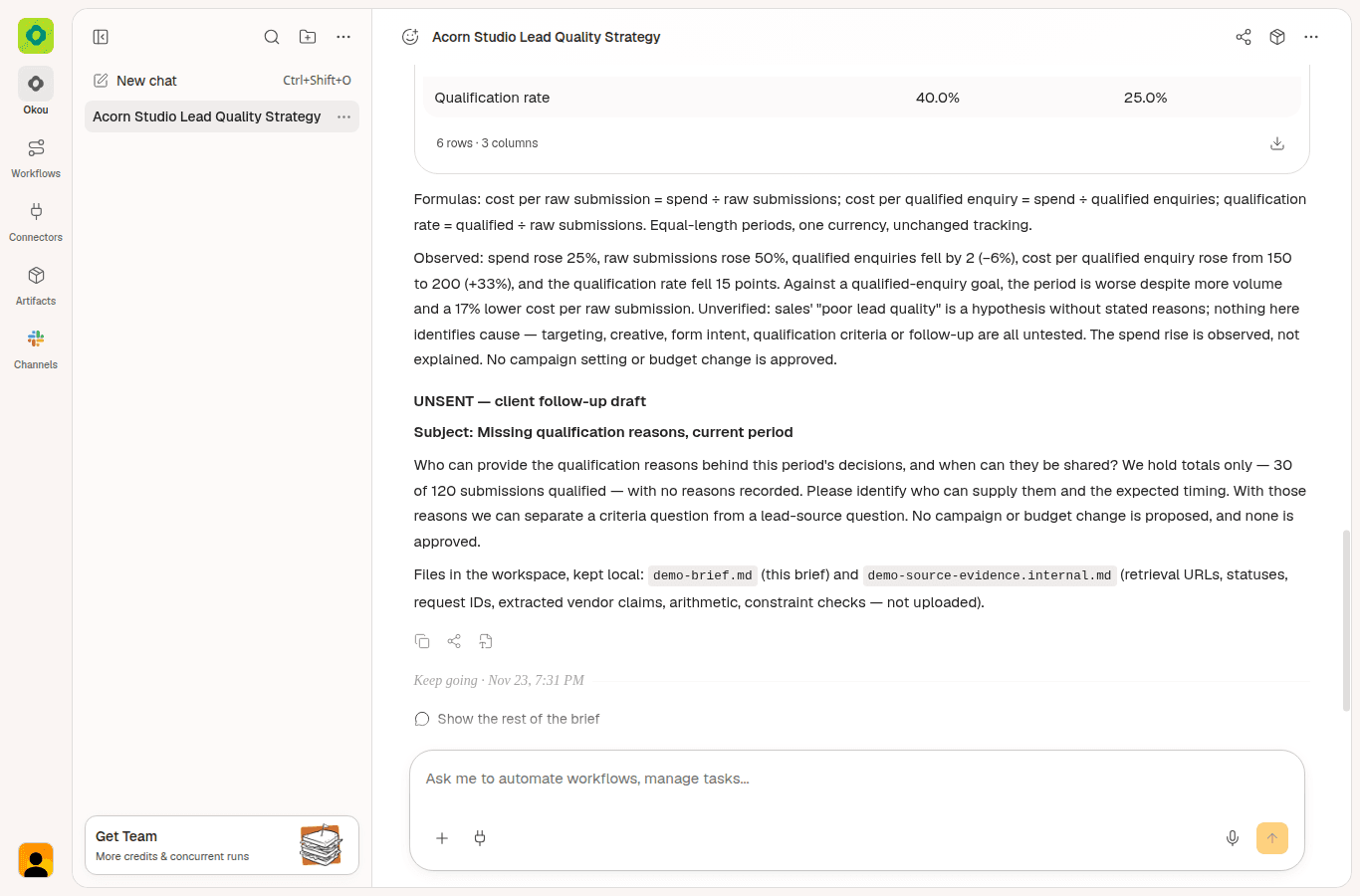
Figure 3. The same full Okou interface at a later scroll position. The UNSENT chat draft asks for missing qualification reasons and timing without inventing a recipient or commitment. It is not a mailbox draft or approval screen. Source: controlled staging-browser demo, November 23, 2026.
The demo deliberately stopped at chat text. No mailbox was connected. For a real email handoff, inspect the actual recipient, draft state, and attachments in your approved email tool before sending.
Keep the internal action register separate from the client email. It can contain unresolved questions, source locations, and scope flags that don't belong in a polished recap.
Before sending, check the recipients and attachments as carefully as the wording. “Draft ready” means a reviewer can inspect it. It does not mean the client received it.
A real second turn: update the handoff when evidence changes
In the first turn of this controlled test, the report established the Acorn baseline: $6,000 spend, 120 current-period submissions, 30 qualified enquiries, and no approved budget or settings change. In the next message, we supplied new fictional Sales evidence: 60 submissions were outside the service area, 15 were duplicates, and 15 were unreachable; qualification criteria were unchanged. Only a read-only review of geographic targeting was approved. No owner or deadline had been assigned.
The updated result kept the raw figures intact: $50 per submission and $200 per qualified enquiry. It labeled the deduplicated view separately: 120 − 15 = 105 unique submissions, $6,000 ÷ 105 = $57.14 each, and 30 ÷ 105 = 28.6% qualified. No previous-period unique count was supplied, so it did not invent that comparison.
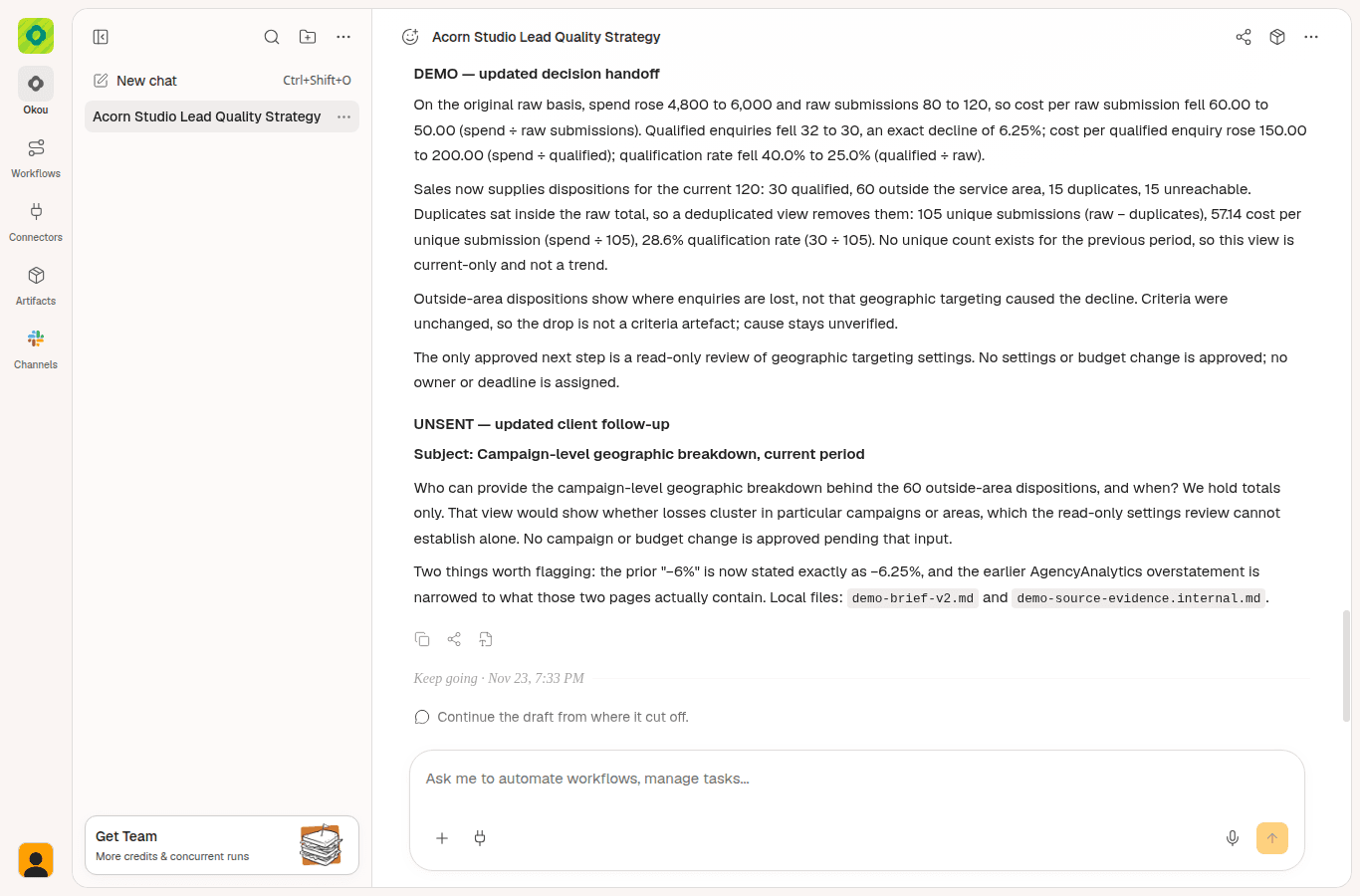
Figure 4. Full Okou desktop UI showing the genuine second-turn handoff and updated UNSENT draft. New Sales evidence refines the next evidence request without replacing the raw measurement basis or approving changes. Both turns used the same test account and conversation. Source: controlled staging-browser demo, November 23, 2026.
Sixty outside-area dispositions are an observation, not proof that targeting caused them. The output preserved that distinction and the no-change constraint. This is the demonstrated context-to-action behavior: incorporate new information, prepare a more specific evidence request, and leave the decision with people. It is not evidence that two colleagues collaborated in the product.
How to choose AI tools for an agency
Choose around your biggest handoff problem. Avoid buying a new system just because it can generate another summary.
| Your main bottleneck | What to evaluate | What to verify before committing |
|---|---|---|
| Gathering client and competitor information | A research-capable assistant with relevant data sources | Actual source coverage, dates, citations, and unavailable-source handling |
| Carrying a client brief into the next action | A context-aware assistant such as Okou | Whether its report and follow-up preserve goals, prior decisions, and unresolved questions |
| Producing reports from connected performance data | A reporting platform with AI analysis | Metric definitions, source links, and account permissions |
| Handing findings between strategist, analyst, and account lead | A collaborative working experience | What colleagues can actually inspect, discuss, and access without sharing another person's accounts |
| Creative review and version feedback | A review platform | Version traceability and human approval records |
For example, AgencyAnalytics describes AgencyAI as answering questions from connected client reporting data with links to the relevant report or dashboard. Ziflow describes its agency AI use around creative checks and review workflows. Those are different starting points.
These are vendor descriptions, checked November 23, 2026, not results from testing the products. A tool's presence in this article is not a ranking or a recommendation for every agency.
Where Okou fits
Evaluate Okou when your agency needs research and action to stay connected to the context of the client assignment. Its role is to gather useful information, understand the existing brief and discussion, and prepare reviewable work that helps people decide what happens next.
Three questions matter:
- Does it act on context? In the demo, the client's qualified-enquiry goal changed which metric mattered. The same context then shaped an unsent request for missing evidence, rather than an unsupported budget recommendation.
- Does its research help the team decide? In the two-page test, the source-attributed brief separated vendor descriptions from what could explain Acorn's result. Evaluate built-in research data against your own required sources and dates; this narrow result does not establish broader coverage. Ask for competing explanations and remaining gaps—not just a longer company summary.
- Can colleagues work with the result? Evaluate the collaboration experience: can the strategist and account lead inspect the relevant evidence and decisions, understand what changed, and pick up the next action with the right access? We didn't test a second user, so this article doesn't certify shared editing, permissions, or cross-account visibility.
The current product explanation describes one private Okou per person and conversations grouped into Projects. Don't confuse working together with borrowing a colleague's connected accounts. Check exact tools, sharing behavior, and client-data boundaries before making a client commitment.
The Okou security page describes data-handling controls and its current compliance status. Read that status precisely: as checked for this draft, SOC 2 Type II was listed as in progress, not a completed certification.
Run a one-client pilot before expanding
Pick one assignment with an existing manual version. Use approved or redacted inputs and compare the AI-assisted draft with the work your team would otherwise deliver.
Record the full effort:
Net time saved = manual completion time − (AI setup + running and checking + corrections + final handoff time).
Log tool costs and rework too. A fast first draft may still take longer to verify than the original process.
Your pilot scorecard should track:
| Check | What to record |
|---|---|
| Evidence | Unsupported claims, broken references, and missing sources |
| Accuracy | Incorrect figures, definitions, or commitments |
| Effort | Setup, review, correction, and handoff time |
| Boundaries | Wrong-client information, wrong recipients, or unexpected writes |
Stop and investigate any client-data mix-up or unauthorized action. Revise the procedure when review effort exceeds the benefit. Repeat the pilot under normal working conditions before extending it to more accounts.
Common questions about AI for agencies
Can AI write client reports?
It can help draft summaries from the data you supply or authorize it to read. The agency still needs to verify calculations, metric definitions, and recommendations. If data is missing, the report should show the gap rather than produce a confident explanation.
How should the team work with AI-generated client research?
Let the strategist inspect sources and competing explanations, the analyst verify metric definitions and calculations, and the account lead approve the client-facing recommendation. Keep the relevant context and outstanding questions with the handoff. Verify what each colleague can actually access in your chosen tool; this demo did not test multi-user collaboration.
Should AI send client follow-ups automatically?
Start with drafts. A follow-up can create a commercial commitment even when it looks routine. Keep account-lead approval until your agency has defined and tested a narrower policy for permitted sends. Pricing, scope changes, and sensitive account discussions need explicit review.
Start with one deliverable you can inspect
Choose the assignment with clear inputs and an output your account lead already knows how to review. Define acceptance before running it, then compare the finished work and total effort with your current process.
To evaluate Okou for your agency, bring an approved brief, relevant discussion, and a redacted report into one assignment. Ask which evidence is missing, gather it from approved sources, then have Okou prepare a decision brief and an unsent follow-up based on that context. Review the work with your strategist or account lead. Expand only when the research is checkable and the next action reflects what the team actually agreed.
Sources and verification date
Product descriptions were checked on November 23, 2026. They establish what the vendors describe, not independently measured performance. Calculations in the fictional reporting example were checked separately.
- Okou homepage — current positioning and publicly described work outputs.
- Okou: We Built Multi-Agent. Here's Why We're Moving to One Okou, November 9, 2026 — current personal-agent, account, Workflow, and Project model.
- Okou security — published controls and self-described compliance status.
- Okou: AI Agent Context Management for Team Collaboration, October 19, 2026 — source selection and permission principles. Its older shared-agent wording should be read alongside source 2.
- Okou: How to Analyze an Instagram Profile for Your Content Strategy, dated November 18, 2026 in the retrieved article — a documented public-profile example and its limits; not a test performed for this draft.
- AgencyAnalytics, AgencyAI feature page — vendor-described reporting analysis and source references; checked November 23, 2026.
- Ziflow, AI for Digital Agencies, May 27, 2026 — vendor-described creative review use cases; checked November 23, 2026.
- Controlled Okou demonstration, November 23, 2026 — two turns using fictional Acorn Studio inputs. Real interface output, not a customer case study, multi-user test or performance benchmark.